Play, mod and host Minecraft from one native app.

Enzonic Launcher is a free launcher for Minecraft: Java Edition. Keep instances in folders, install from Modrinth and CurseForge, share modpacks with a code, play with the Enzonic Client and start a server on your computer or in Enzonic Cloud.

Free for Windows, macOS and Linux. Requires Minecraft: Java Edition.

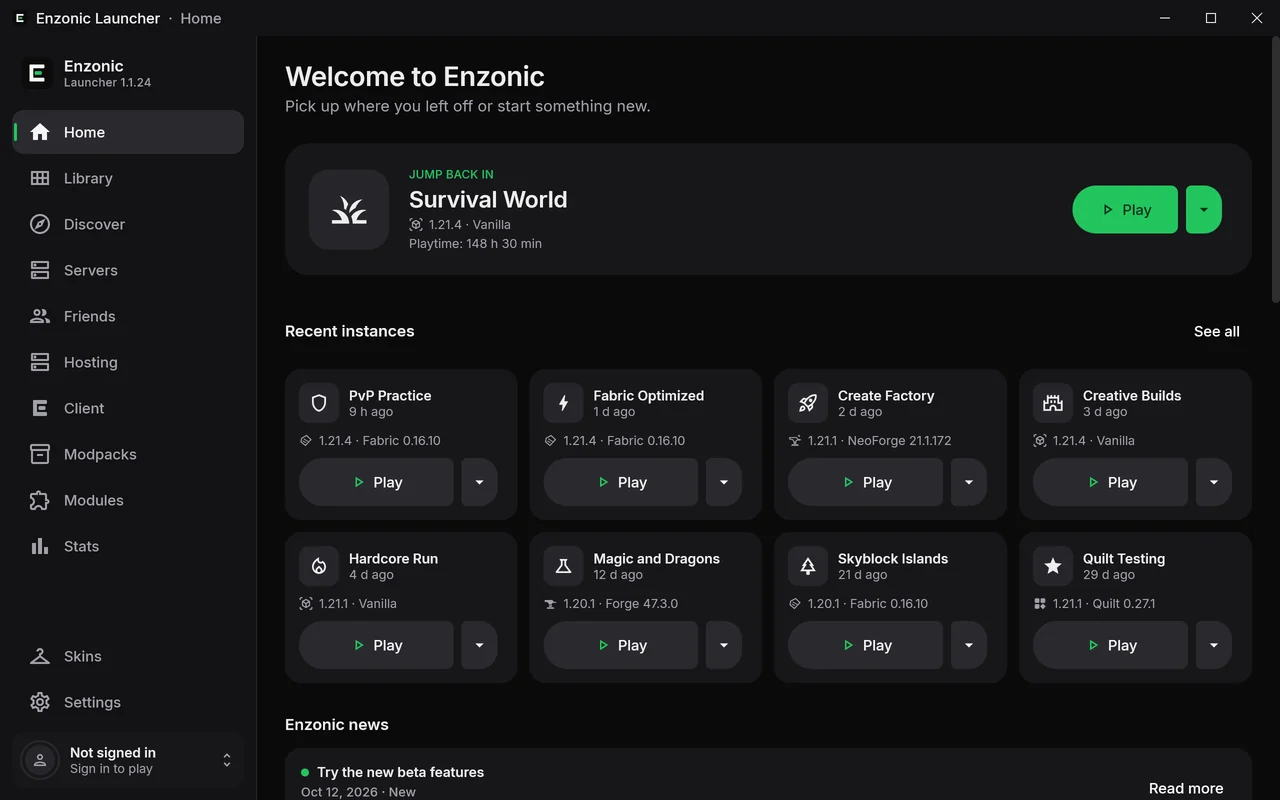
Enzonic Launcher home page with a Jump back in card for the last played instance, eight recent instances and Enzonic news
Screenshots of Enzonic Launcher on Windows, with sample instances. Choose a section.

Everything between the menu and the server

Each part of the launcher is built for one job, and they work together.

See all featuresCompare with other launchers

Instances and folders

Give every version and loader its own instance: vanilla, Fabric, Quilt, Forge or NeoForge. Group them into folders, and set Java, memory, JVM arguments and resolution per instance. Logs and crash detection are built in.

  • Managed Java per Minecraft version
  • Duplicate an instance to experiment safely
  • Open any instance folder in one click

Modrinth and CurseForge

Search mods, modpacks, resource packs, shaders and data packs from Modrinth and CurseForge, filtered to the instance's version and loader. Dependencies are resolved for you and updates are checked against the files you have.

Modpacks you can pass around

Turn any instance into a modpack, edit its mod list, then export a .mrpack file or create a share code. Friends paste the code into their launcher and get the same pack.

Enzonic Client

A Fabric client mod with its own HUD mods, written from scratch and installed automatically into Enzonic Client instances. Move and resize every element in the HUD editor.

  • FPS
  • CPS
  • Keystrokes
  • Zoom
  • Armor status
  • Potion effects
  • Coordinates
  • Ping
  • Clock
  • Toggle sprint
  • Fullbright
  • Crosshair

Start a server without leaving the launcher

Pick where it runs. Both options are on the Hosting page.

Enzonic Cloud

Free tier

Create a server on Enzonic's hosting in a few clicks, control power and open the panel from the launcher.

RAM
3.5 GB
CPU
2 vCPU (200%)
SSD storage
5 GB
Idle
Hibernates after 15 minutes without players
See plans on enzonic.com(opens in a new tab)

Host on your computer

Choose server software and a version. The launcher downloads Java and the server, asks you to accept the Minecraft EULA, starts it and connects it to Enzonic Tunnel for a public address friends can join. Each tunnel accepts players from up to 3 different IP addresses.

Run your own tunnel relay

Operators can run an Enzonic Tunnel relay on their own Linux server with one command:

curl -fsSL https://launcher.enzonic.com/tunnel/install.sh | sudo bash
Learn about Enzonic Tunnel

Modules and Enzica

Modules add pages and tools to the launcher. They run in a sandbox and can only use the permissions they declare, which you approve when installing. Every version is reviewed before it is listed.

Enzica

An agent that reads your logs, inspects instance files, searches Modrinth and can install, update, disable or remove mods and run a test launch. It asks before every change. Turn on YOLO mode if you want it to act without asking.

Sign in with Microsoft

Play with your own Minecraft account through Microsoft's sign-in. Your account tokens stay in your operating system's keychain on your device.

Download Enzonic Launcher

Installers are downloaded directly from launcher.enzonic.com. Latest release: 1.1.33.

Windows

Windows installer (.msi)

Version 1.1.33 · 149.7 MB

SHA-256b1fb737a66ccc40434e05395ebc18ee3e2c088ba3d77c15327b7eddefb71c4ba

Or install with wingetNot available yet

winget install --id Enzonic.EnzonicLauncher --exact

Enzonic Launcher is not on winget yet. Until it is, use the download above.

macOS

macOS, Apple silicon (.zip)

Version 1.1.33 · 161.2 MB

SHA-256c34d3ee4da69a454e592c7a6491eccbcd2c0eb51342097b8386fd979b41ae323
macOS, Intel (.zip)

Version 1.1.33 · 158.9 MB

SHA-25613a5367beebf3b507f337bc224f828b117010bec277d9cc81b6aaf7ab4c24192

First launch: unzip, move Enzonic Launcher to Applications, then right-click it and choose Open (the app is not notarized yet). If macOS still refuses, use System Settings › Privacy & Security › Open Anyway.

Or install with HomebrewNot available yet

brew install --cask enzonic/tap/enzonic-launcher

Enzonic Launcher is not on Homebrew yet. Until it is, use the download above.

Linux

Debian and Ubuntu (.deb)

Version 1.1.33 · 156.7 MB

SHA-256fec6f950eeaefd23ac68dad4485c5d7370b74c236c239e9ca27c6f23bc0bb498
Fedora and openSUSE (.rpm)

Version 1.1.33 · 156.7 MB

SHA-256ff883cea6d6fb857f3ee6e97b35e1e08e11278eb096de544c97d70f19a9ea3ac
Any distribution (AppImage)

Version 1.1.33 · 168.6 MB

SHA-25678a0316d151a7047cd709d859171f612000ef9305028400324e478c04068f3d6

Or install with FlathubNot available yet

flatpak install flathub com.enzonic.Launcher

Enzonic Launcher is not on Flathub yet. Until it is, use the download above.

Check a download before running it: compare its SHA-256 with sha256sum on Linux, shasum -a 256 on macOS or Get-FileHash in PowerShell on Windows.All files and checksums (latest.json)Only download Enzonic Launcher from launcher.enzonic.com. If your system warns about an unrecognized app, check that the file came from this site and that its SHA-256 matches.

Questions

Is Enzonic Launcher free?

Yes. The launcher, the Enzonic Client and modules are free. Enzonic Cloud has a free tier and paid plans, which are offered on enzonic.com.

Do I need to own Minecraft?

Yes. You need Minecraft: Java Edition and a Microsoft account. The launcher downloads game files directly from Mojang and Microsoft.

Is this an official Minecraft product?

No. Enzonic Launcher is not an official Minecraft product and is not approved by or associated with Mojang or Microsoft.

Which mod loaders are supported?

Fabric, Quilt, Forge and NeoForge, plus vanilla. The launcher installs the loader you pick when you create an instance.

What do I get with the free Enzonic Cloud server?

3.5 GB of RAM, 2 vCPU (200% CPU), 5 GB of SSD storage. The server hibernates after 15 minutes with no players.

Are modules safe to install?

Modules run in a sandbox with no direct access to your computer. They can only use the permissions they declare, you approve those permissions, actions that change files or mods ask first, and the Enzonic team reviews every version before it is listed.

What does Enzica send to the model provider?

Your messages and the tool results the agent needs, such as log excerpts or a mod list. The AI disclosure explains this in detail. Read the AI disclosure

Can I bring my existing modpacks?

Yes. Import .mrpack files, CurseForge modpack zips, Modrinth modpacks and Enzonic share codes, or bring instances over from Prism Launcher, MultiMC, CurseForge, Modrinth App, ATLauncher, GDLauncher, Technic Launcher, Lunar Client, Feather Client and the official Minecraft Launcher.

Need help?

Email admin@enzonic.com and include your operating system and launcher version.

Theme

Language

Sign-in only works on launcher.enzonic.com because Enzonic accounts are tied to the enzonic.com domain.